Filesystem Explorer
Overview
The Filesystem Explorer is a UEFI application that accesses EFI volumes through the Simple File System Protocol and recursively enumerates directories and files.
It demonstrates how UEFI applications can interact with storage devices before an operating system is loaded.
Goal
The goal of this application is to understand how UEFI exposes filesystem functionality through protocols and how applications can open, enumerate and read files directly from EFI volumes.
What it demonstrates
- Locating
EFI_SIMPLE_FILE_SYSTEM_PROTOCOL - Opening the root volume
- Enumerating directories recursively
- Retrieving file metadata
- Reading file contents
- Handling dynamically sized UEFI structures
Protocol Workflow
The application first locates the filesystem protocol:
    LocateProtocol()
            |
            v
    EFI_SIMPLE_FILE_SYSTEM_PROTOCOL
            |
            v
    OpenVolume()
            |
            v
    Root EFI_FILE_PROTOCOL
            |
            v
    Read / Open / Enumerate
Directory Enumeration
Directory entries are read using EFI_FILE_PROTOCOL.Read().
Each call returns an EFI_FILE_INFO structure describing one file or directory.
The application continues reading entries until the returned size becomes zero.
Recursive Traversal
The explorer recursively visits subdirectories:
    Root
     ├── EFI
     │    ├── BOOT
     │    └── tools
     ├── apps
     └── kernel
This demonstrates how UEFI filesystem APIs can be used to build tools such as:
- Boot managers
- File browsers
- Diagnostic utilities
- Kernel loaders
Handling EFI_FILE_INFO
EFI_FILE_INFO is a variable-sized structure.
The application must:
- Query the required buffer size
- Allocate memory
- Read the structure
- Free the memory afterwards
This is a common pattern in UEFI APIs.
Output
Example directory listing:
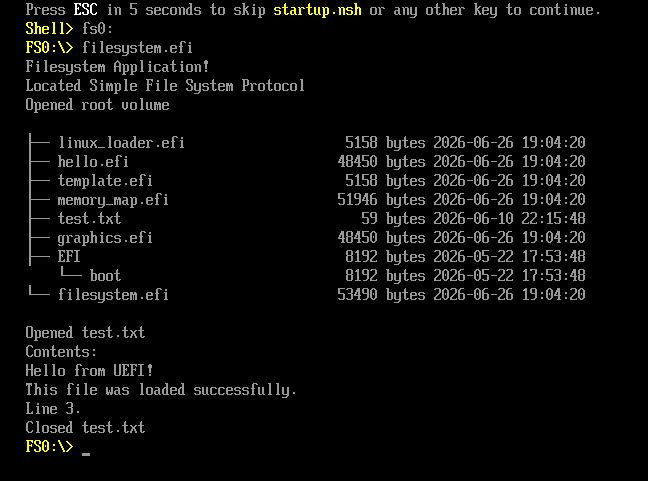
The application displays:
- File and directory names
- File sizes
- Directory hierarchy
- Recursive traversal depth
Related Concepts
Next Steps
After exploring filesystem access, the next application demonstrates direct graphics rendering through the Graphics Output Protocol (GOP).