Memory Map Viewer
Overview
The Memory Map Viewer is a UEFI application that retrieves and displays the firmware memory map.
It demonstrates how UEFI exposes the current system memory layout before an operating system takes control.
Goal
The goal of this application is to understand how firmware manages memory and how an operating system loader can retrieve this information before calling ExitBootServices().
What it demonstrates
- Calling
GetMemoryMap() - Allocating memory using
AllocatePool() - Handling EFI memory descriptors
- Iterating descriptors using
DescriptorSize - Converting memory types into readable names
- Grouping contiguous memory regions
- Displaying formatted output in the UEFI console
UEFI Memory Map
The UEFI memory map describes how physical memory is currently used by the firmware.
Each entry is an EFI_MEMORY_DESCRIPTOR containing information such as:
- Memory type
- Physical start address
- Number of pages
- Memory attributes
A simplified example:
Memory Type        Start Address        Size

Loader Code       0x00000000A0000000   64 KB
Boot Services     0x00000000B0000000   2 MB
Conventional RAM  0x00000001C0000000   512 MB
GetMemoryMap Workflow
GetMemoryMap() requires a specific workflow.
The application must first query the required buffer size:
Call GetMemoryMap()

        |
        v

EFI_BUFFER_TOO_SMALL

        |
        v

Allocate buffer

        |
        v

Call GetMemoryMap() again

        |
        v

Process descriptors
Memory Allocation Considerations
An important detail is that allocating the memory map buffer changes the memory map itself.
This means the typical workflow is:
- Request the required size
- Add additional space for changes
- Allocate the buffer
- Retrieve the final memory map
Example:
MemoryMapSize += 2 * DescriptorSize;
The additional space prevents allocation changes from invalidating the second call.
Descriptor Iteration
EFI memory descriptors must not be iterated using normal pointer arithmetic:
Descriptor++;
The descriptor size is firmware-defined.
The correct approach is:
Descriptor =
    (EFI_MEMORY_DESCRIPTOR*)
    (
        (UINT8*)Descriptor + DescriptorSize
    );
This allows the application to work with different firmware implementations.
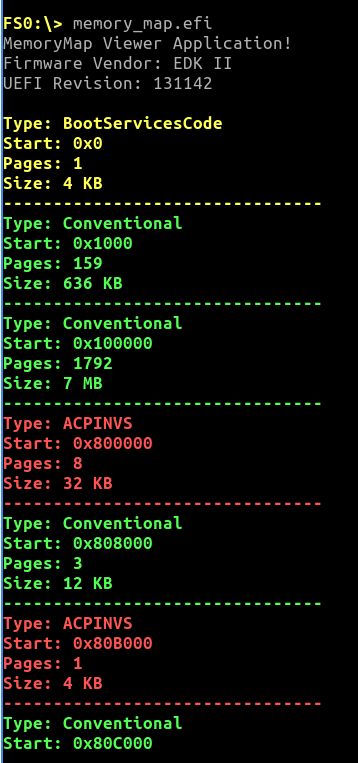
Output
The application displays:
- Memory type
- Physical address
- Page count
- Calculated size
Contiguous regions of the same memory type are grouped together to improve readability.
Example output:
Related Concepts
Next Steps
The next application explores filesystem access through UEFI protocols: