UEFI Memory Map
Overview
The UEFI memory map describes how physical memory is currently used by the firmware before an operating system takes control.
It is one of the most important data structures in the UEFI boot process because a boot loader must obtain the final memory map immediately before calling ExitBootServices().
Why It Exists
During firmware execution, memory is used for many different purposes:
- UEFI code
- Boot Services data
- Runtime Services data
- ACPI tables
- Device memory mappings
- Conventional RAM available to the operating system
The memory map allows a boot loader to distinguish between memory that is free and memory that must be preserved.
EFI_MEMORY_DESCRIPTOR
Each entry in the memory map is an EFI_MEMORY_DESCRIPTOR.
A descriptor contains information such as:
- Memory type
- Physical start address
- Number of pages
- Attributes
A simplified view:
EFI_MEMORY_DESCRIPTOR
├── Type
├── PhysicalStart
├── VirtualStart
├── NumberOfPages
└── Attribute
Retrieving the Memory Map
UEFI requires a two-step GetMemoryMap() workflow.
The application cannot know the required buffer size in advance.
The typical sequence is:
GetMemoryMap(NULL buffer)
        |
        v
EFI_BUFFER_TOO_SMALL
        |
        v
AllocatePool(required size)
        |
        v
GetMemoryMap(real buffer)
        |
        v
Process descriptors
Why Two Calls Are Necessary
The first call returns:
- Required buffer size
- Descriptor size
- Descriptor version
After allocating the buffer, the application calls GetMemoryMap() again to retrieve the actual descriptors.
This pattern appears frequently in UEFI APIs.
Important: Allocation Changes the Memory Map
A subtle but critical detail is that AllocatePool() itself modifies the memory map.
For this reason, applications usually reserve additional space before allocation.
Example:
MemoryMapSize += 2 * DescriptorSize;
Without the extra space, the second GetMemoryMap() call may fail because the map changed during allocation.
Iterating Descriptors
Descriptors are not guaranteed to be tightly packed.
The firmware provides the correct descriptor size.
Incorrect:
Descriptor++;
Correct:
Descriptor =
    (EFI_MEMORY_DESCRIPTOR*)
    (
        (UINT8*)Descriptor + DescriptorSize
    );
This works across different firmware implementations.
Common Memory Types
Frequently encountered memory types include:
| Memory Type | Purpose |
|---|---|
EfiLoaderCode | Boot loader executable code |
EfiLoaderData | Boot loader data |
EfiBootServicesCode | Firmware Boot Services code |
EfiBootServicesData | Firmware Boot Services data |
EfiRuntimeServicesCode | Runtime Services code |
EfiRuntimeServicesData | Runtime Services data |
EfiConventionalMemory | Free RAM available to the OS |
EfiACPIReclaimMemory | ACPI tables reclaimable by the OS |
EfiACPIMemoryNVS | ACPI NVS memory that must be preserved |
EfiMemoryMappedIO | Device memory mappings |
For operating system development, EfiConventionalMemory is usually the most important category because it represents usable physical RAM.
Page Count and Size
UEFI reports memory in 4 KiB pages.
The size of a region is calculated as:
SizeInBytes = NumberOfPages * 4096;
Example:
| Pages | Size |
|---|---|
| 1 | 4 KiB |
| 256 | 1 MiB |
| 512 | 2 MiB |
| 32768 | 128 MiB |
The MapKey
GetMemoryMap() also returns a MapKey.
The MapKey identifies the exact version of the memory map.
When calling ExitBootServices(), the boot loader must provide the same MapKey that was returned by the final successful GetMemoryMap() call.
If the memory map changes between these calls, ExitBootServices() fails.
This is one of the most common pitfalls in UEFI boot loader development.
Example Output
The Memory Map Viewer application displays descriptors in a human-readable format:
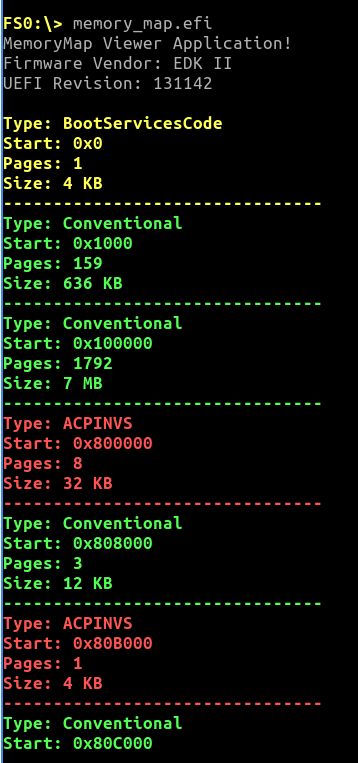
The output includes:
- Memory type
- Physical start address
- Page count
- Calculated size
Contiguous regions of the same type are grouped together to improve readability.
Related Applications
Related Findings
Why This Matters for the Boot Loader
The future Linux loader in this project will rely on the memory map to:
- Identify usable RAM
- Avoid firmware-reserved regions
- Retrieve the final MapKey
- Successfully call
ExitBootServices() - Transfer control to the kernel
Understanding the memory map is therefore a prerequisite for implementing a correct firmware-to-kernel handoff.